


Day/Night Reversible Landscape - Original Oil Painting - Round Seascape - 8 inches
Day/Night Reversible Landscape - Original Oil Painting - Round Seascape - 8 inches
Two moods, one stunning canvas.
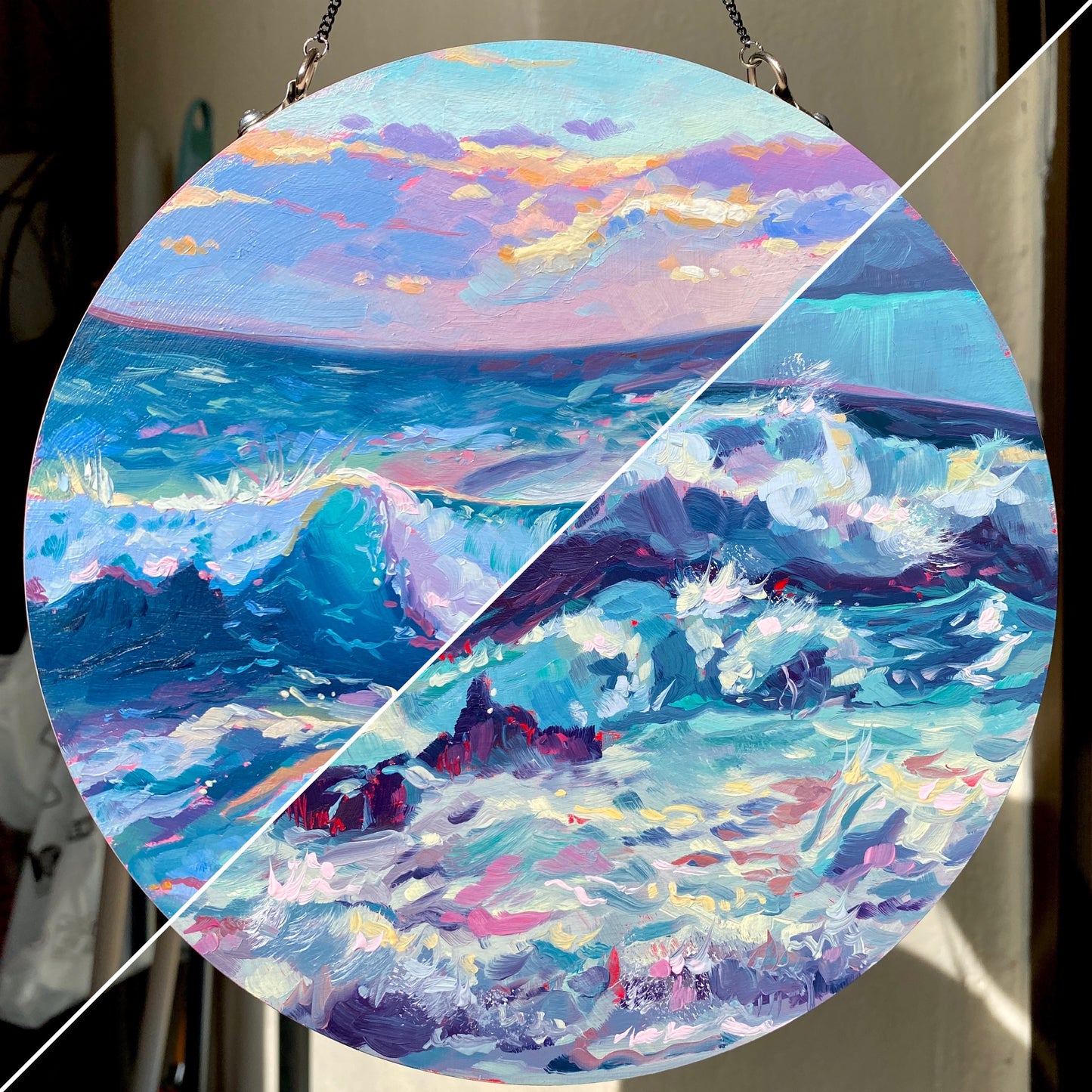
"Day/Night" is a highly unique, interactive original oil painting that gives you two complete artworks in one piece. Painted on a circular wood panel, you can choose which atmosphere fits your mood. The "Day" side bursts with energy, featuring a bright turquoise ocean wave crashing beneath a pastel sunset sky of pinks, purples, and golden oranges. Flip it over, and the "Night" side immerses you in a moody, dramatic seascape dominated by deep indigos, violet storm clouds, and turbulent, moonlit waters.
Painted on an 8-inch (Ø 20 cm) handmade primed solid wood panel, this piece is fully varnished and protected on both sides. It comes completely ready to hang via an elegant attached chain, allowing it to spin freely in a window or be easily flipped on a wall. It’s a dynamic, space-saving way to collect and display original art.
Why this original is a fresh pick:
- Two Artworks in One: The reversible design lets you instantly change the vibe of your room from a bright sunset to a moody nightscape.
- Expressive Seascapes: Both sides feature Alai's signature thick impasto brushstrokes, giving the crashing waves incredible movement and texture.
- Interactive Display: The circular panel and top-mounted chain turn this painting into a suspended, sculptural object rather than a traditional wall-bound canvas.
Technical Details:
- Medium: Two original Oil paintings (one on each side).
- Surface: Handmade primed solid wood panel (circular).
- Size: Ø 20 cm (approx. 8 inches in diameter).
- Finish: Fully varnished and UV protected on both sides.
- Ready to Hang: Yes (includes attached hanging chain).
- Authenticity: Includes a Certificate of Authenticity (COA) hand-signed by me.
Unboxing & Shipping:
Your painting arrives wrapped with care, including special care instructions and exclusive goodies. We offer worldwide delivery with tracked and insured shipping, ensuring your original art arrives safe and sound.
Painted and shipped directly from the studio by Alai Ganuza. Made with professional paints and materials. Can be hung like this or framed for extra character.
Couldn't load pickup availability



More available works
-
Egg Couple - Fine Art Giclée Print - Vibrant Fried Egg Still Life
Regular price From €45,00 EURRegular priceUnit price per -
Plant in Studio Sink - Fine Art Giclée Print - Atmospheric Still Life
Regular price From €45,00 EURRegular priceUnit price per€35,00 EURSale price From €45,00 EUR -
Sink and Pink Soap - Fine Art Giclée Print - Bathroom Still Life
Regular price From €45,00 EURRegular priceUnit price per€35,00 EURSale price From €45,00 EUR -
Imaginary Breakfast - Fine Art Giclée Print - Sunny Side Up Egg Still Life
Regular price From €45,00 EURRegular priceUnit price per€35,00 EURSale price From €45,00 EUR


