


Fig Couple - Original Oil Painting - Vibrant Fruit Art - 6x6 inches
Fig Couple - Original Oil Painting - Vibrant Fruit Art - 6x6 inches
A sweet, jammy pair to add richness to your home.
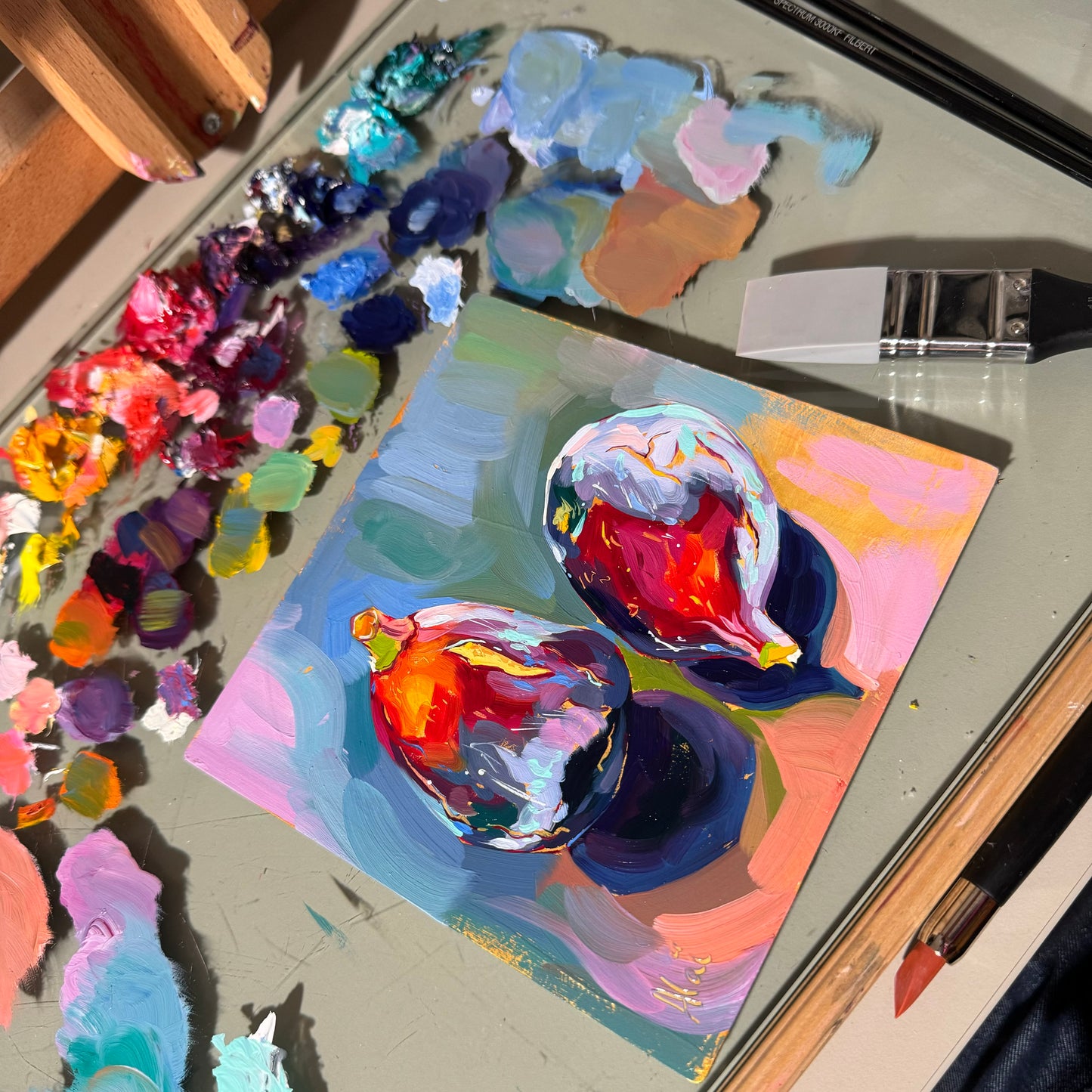
"Fig Couple" is a luscious original oil painting that captures the sophisticated beauty of ripe fruit. The composition features two plump figs, one standing tall and the other leaning intimately beside it. Their skins are rendered in deep, velvety shades of violet and maroon, illuminated by striking orange and lime green highlights near the stems that suggest perfect ripeness. The fruit rests on a surface of warm pink and ochre brushstrokes, contrasting beautifully with the cool, abstract background of blues and teals.
Painted on a unique hand-primed aluminium panel, this piece offers a sleek, archival foundation for the art. Alai’s signature impasto brushwork glides over the smooth metal surface, creating a rich, buttery texture that makes the figs look almost jewel-like. It’s a small but powerful piece, perfect for adding a touch of elegance and color to a kitchen or dining nook.
Why this original brings life to your wall:
- Jewel-Tone Palette: The luxurious combination of deep purples, fiery oranges, and cool blues creates a sophisticated color story that draws the eye.
- Premium Surface: Painted on a rigid aluminum panel, this artwork is durable, lightweight, and archival, offering a modern twist on traditional oil painting.
- Dynamic Composition: The positioning of the two figs creates a sense of relationship and balance, making the still life feel alive and grounded.
Technical Details:
- Medium: Oil painting.
- Surface: Hand-primed aluminium panel (rigid and archival).
- Size: 15x15 cm (approx. 6x6 inches).
- Ready to Hang: Yes.
- Authenticity: Includes a Certificate of Authenticity (COA) hand-signed by me.
Unboxing & Shipping: Your painting arrives wrapped with care to ensure it travels safely from my studio to your home. We offer worldwide delivery with tracked and insured shipping.
Painted and shipped directly from the studio by Alai Ganuza. Made with professional paints and materials. Can be hung like this or framed for extra character.
Couldn't load pickup availability


More available works
-
Egg Couple - Fine Art Giclée Print - Vibrant Fried Egg Still Life
Regular price From $52.00 USDRegular priceUnit price per -
Plant in Studio Sink - Fine Art Giclée Print - Atmospheric Still Life
Regular price From $52.00 USDRegular priceUnit price per$40.00 USDSale price From $52.00 USD -
Sink and Pink Soap - Fine Art Giclée Print - Bathroom Still Life
Regular price From $52.00 USDRegular priceUnit price per$40.00 USDSale price From $52.00 USD -
Imaginary Breakfast - Fine Art Giclée Print - Sunny Side Up Egg Still Life
Regular price From $52.00 USDRegular priceUnit price per$40.00 USDSale price From $52.00 USD


