


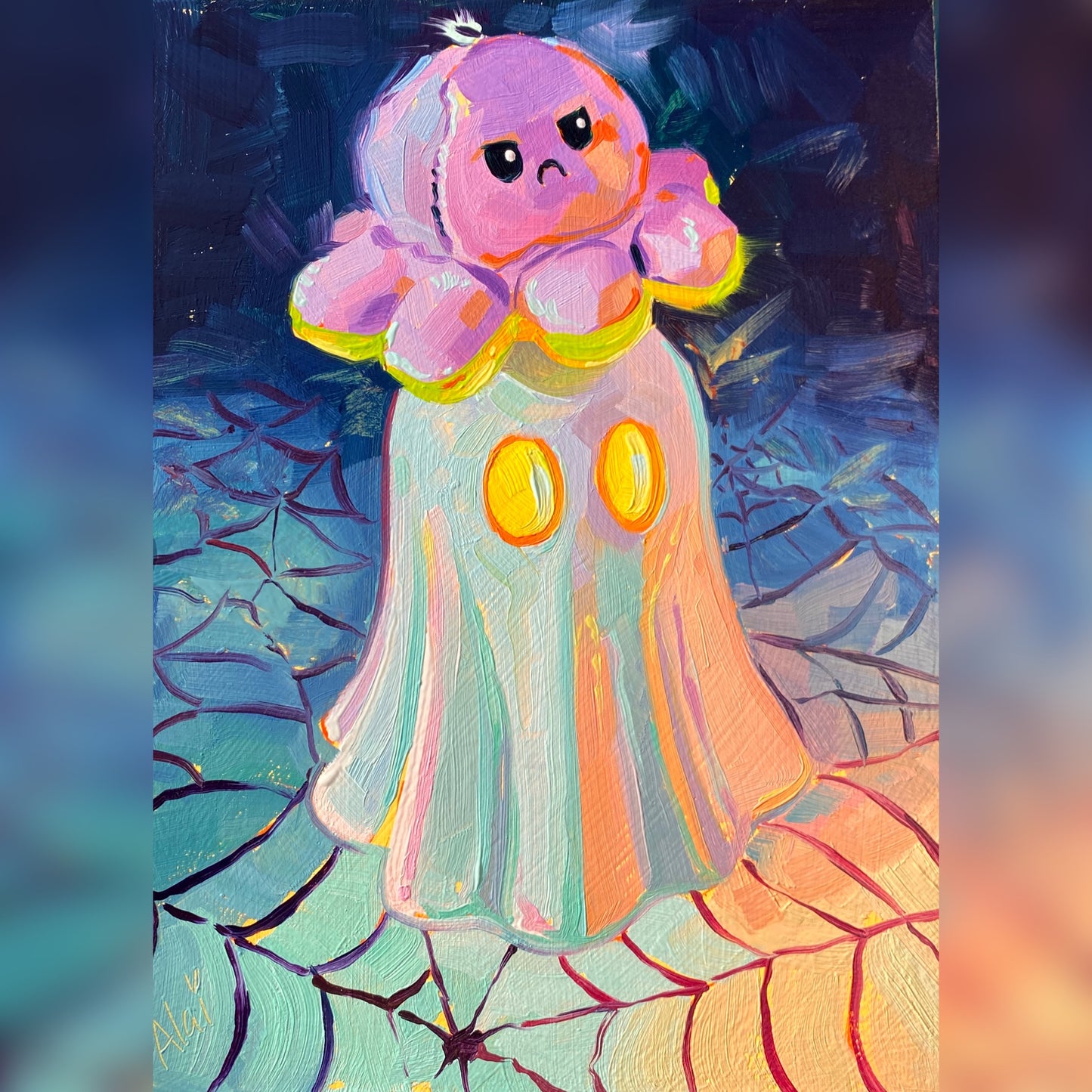
Octoplushie and Ghost - Original Oil Painting - Spooky Cute Art - 7.5 inches
Octoplushie and Ghost - Original Oil Painting - Spooky Cute Art - 7.5 inches
Spooky, grumpy, and irresistibly cute.
"Octoplushie and ghost" is a whimsical original oil painting that blends Halloween vibes with playful nostalgia. The composition features a grumpy pink plush octopus sitting squarely on the head of an iridescent ghost figure with glowing yellow eyes. The duo rests on a highly textured surface patterned like a colorful spiderweb, shifting through vibrant pastel tones of teal, purple, and orange against a dark, moody background.
Painted on a 14.5x19.5 cm (5.5x7.5 inch) hand-primed wooden panel, this piece is full of thick, expressive brushwork. Alai’s signature impasto technique makes the plushie look soft and squishy, while the ghost seems to shimmer with a magical, reflective light. It’s an adorable, spooky-cute addition to a shelf, desk, or gallery wall.
Why this original is a fresh pick:
- Playful Character: The grumpy expression of the octopus, paired with the classic ghost, creates a humorous and charming narrative.
- Iridescent Illusions: The masterful use of pastel tones on the ghost and spiderweb creates a luminous, dreamy effect that catches the eye.
- Textural Depth: Thick oil paint brings the subjects to life, making the octopus feel tactile and the ghost look dimensional.
Technical Details:
- Medium: Original Oil painting.
- Surface: Hand-primed wooden panel.
- Size: 14.5x19.5 cm (approx. 5.5x7.5 inches).
- Ready to Hang: Yes.
- Authenticity: Includes a Certificate of Authenticity (COA) hand-signed by me.
Unboxing & Shipping:
Your painting arrives wrapped with care, including special care instructions and exclusive goodies. We offer worldwide delivery with tracked and insured shipping, ensuring your original art arrives safe and sound.
Painted and shipped directly from the studio by Alai Ganuza. Made with professional paints and materials. Can be hung like this or framed for extra character.
Couldn't load pickup availability


More available works
-
Egg Couple - Fine Art Giclée Print - Vibrant Fried Egg Still Life
Regular price From $52.00 USDRegular priceUnit price per -
Plant in Studio Sink - Fine Art Giclée Print - Atmospheric Still Life
Regular price From $52.00 USDRegular priceUnit price per$40.00 USDSale price From $52.00 USD -
Sink and Pink Soap - Fine Art Giclée Print - Bathroom Still Life
Regular price From $52.00 USDRegular priceUnit price per$40.00 USDSale price From $52.00 USD -
Imaginary Breakfast - Fine Art Giclée Print - Sunny Side Up Egg Still Life
Regular price From $52.00 USDRegular priceUnit price per$40.00 USDSale price From $52.00 USD


